Updated November 2026. I re-read every Microsoft page this essay cites on 16 November 2026. Five product details had changed, or were worded more loosely than the page supports, and they're corrected below. They cover label inheritance, what a web search sends to Bing, file limits, the Notebook's reference cap, and Excel's in-cell COPILOT function, which Microsoft withdrew in September. The architecture itself hasn't changed.
The first time you use Microsoft Copilot for real work the speed is striking. You ask for a briefing draft and you have one in ninety seconds. You ask for a summary across half a dozen files and you get one. Within an afternoon you've done what used to take two days, and you start telling colleagues about it.
A week later you're trying to find the version of a document you sent up the line, and you can't. There are seven near-identical drafts in your chat history, none of them dated. The figure your director just questioned is somewhere in there but you can't tell where it came from. Was it in one of the source files, or did Copilot, confidently and fluently, make it up?
This is the moment most people lose faith in Copilot, and it's the wrong lesson to take. The problem is treating the chat tool as if it were the workspace. Copilot is a processing layer inside a workspace you have to build around it. This is the architecture I run, and why each layer is there.
What Copilot is, and what it isn't
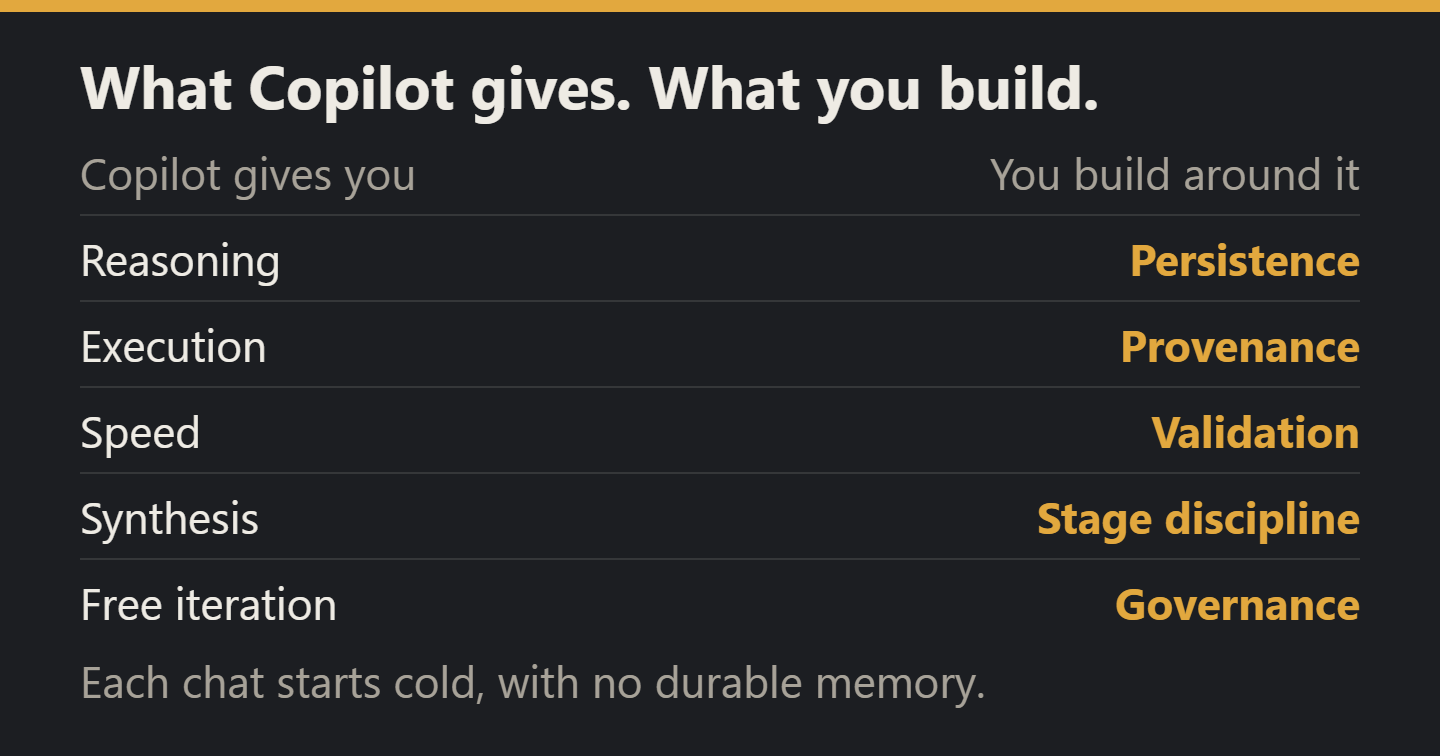
Treat Copilot, or any enterprise LLM assistant of the same shape, as three things at once. It's a reasoning engine that drafts, transforms, summarises and critiques. It's an execution layer that performs structured tasks against the files and tools your tenancy exposes. And it's a stateless processor, where each chat starts cold with no durable memory, skills, hooks or project context. The first two are real capabilities. The third is the constraint that everything else has to be designed around.
That gives you a clean line.
| Copilot reliably gives you | The workspace around it has to give you |
|---|---|
| Reasoning, for drafting, transforming and critiquing | Persistence. The chat isn't durable, so export, version and store its output |
| Execution against the M365 surface (files, mail, calendar, Teams) | Provenance. Every claim traces to a source or is flagged as unsupported |
| Speed, with a defensible draft in minutes instead of hours | Validation. The chat won't check its own work, so you must |
| Synthesis across files, threads, and conversational context | Stage discipline, keeping research, drafting and verification apart |
| A working surface where iteration is essentially free | Governance, with classification, versioning, lifecycle and an audit trail |
Everything in the right column is your job. Copilot will happily proceed as if those columns are merged, which is the source of most of the failures I've seen when people try to use it at scale. The architecture isn't optional.
Four layers around the chat
The workspace I run around Copilot has four layers. None of them is new on its own. The discipline is in keeping them separate.
Interaction. The chat window itself. Ephemeral, non-authoritative, the working surface and nothing more. Nothing in the chat is real until it's been exported, named, and stored somewhere durable. Keep one chat per task. Don't run several Copilot tabs racing on the same topic, and start a new chat when the context window warns you or when you've genuinely changed subject. The chat is where work happens.
Orchestration. The standing rules and modular prompts that turn the chat from a tabula-rasa session into a controlled process. A core harness goes in first, covering Australian English, sources ahead of training-data recall, an uncertainty discipline that prefers omitting a figure to inventing one, a versioning convention and a checklist for the final response. Task modules drop in on top, such as a stage module, a product module (briefing note, slide deck, dashboard headline) and add-on rules when the task touches data, email or sensitive material. The point is that prompts become protocols rather than one-off instructions. You stop typing the same five rules into every session and you start composing reliable runs from named building blocks.
Knowledge. The durable factual base, made of research packs, claim registers, source registers, a methods register and a glossary. These sit outside Copilot, are versioned, and become the source of truth a chat is allowed to reason against. What matters most in this layer is the separation of facts, assumptions, interpretation, implications, and recommendations. Most bad briefing notes blur those five into a single paragraph. A research pack that keeps them apart is what makes a downstream product defensible.
Governance. Provenance, versioning, classification, lifecycle, approval pathway, embedded in artefact metadata and folder structure rather than in Copilot's memory. Every output gets a title, owner, version, status, sensitivity, linked inputs and outputs, and a refresh trigger. None of that lives in the chat. All of it lives in the system of record the chat is feeding.
Two layers most people add (Data and Output) collapse comfortably into Knowledge and Governance once these four are in place. The minimum viable workspace is interaction, orchestration, knowledge, governance.
Evidence first, product second, assurance third
The architecture above is structural. The operating rhythm on top of it is a staged workflow, and in practice this is where most of the quality comes from.
The default failure mode of Copilot in serious work is blending three different tasks into one prompt, such as "Research this, write me a briefing note, and check it for accuracy." What comes back looks coherent, reads fluently, and is almost impossible to audit, because the research, the drafting, and the verification all happened in the same paragraph. You can't tell where a claim came from, what was inferred, what was checked, and what was simply confidently written.
The fix is to refuse to blend the stages. Treat any piece of work that matters as four explicit moves.
- Stage 0: Workspace setup. Classify the inputs (source, reference, template, prior output, draft, superseded), name the current stage, confirm the required output and audience, confirm whether external research is authorised, flag any missing materials that materially affect the task. Five minutes of accounting, paid back in hours.
- Stage 1: Evidence base. Build a structured research pack. Source IDs and Claim IDs, a source register, an evidence table, uncertainty and caveat register, visualisation-ready facts, handoff notes. No polished prose. The deliverable is a defensible factual backbone, not a narrative.
- Stage 2: Communication product. Convert the approved evidence into the briefing note, slide deck, infographic copy, dashboard headline, or executive email, whatever the audience needs. Select, don't dump. No new facts allowed unless explicitly authorised. Trace product claims back to Claim IDs.
- Stage 3: Critical assurance. Verify the draft product against the approved evidence base. Unsupported claims, missing caveats, overstatement, outdated figures, mismatched units, ambiguous geography, selective omission that changes the impression. The verdict is pass, pass with caveats, or do not use yet. Correct and rerun.
Each stage hands off to the next through an explicit manifest naming the evidence pack version, the load-bearing claims, what to caveat, the uncertainties that remain and the framing traps to avoid. The manifest is what stops the next stage from re-deriving prior decisions and creates the audit trail for who approved what. It takes ninety seconds to write and saves the entire chain of work from collapsing the next time someone asks "where did this figure come from?"
The separation is where the rigour comes from. A Stage 1 prompt that tries to also produce the briefing note will produce a worse briefing note and a worse evidence base. A Stage 3 prompt that quietly does new research will hide the gap it just papered over. Refusing to blend is unglamorous, and it's one of the biggest quality levers in the pattern.
Validation runs as a ladder through the workflow rather than as a closing step. L0 checks presentation, L1 internal consistency, L2 alignment with the sources and L3 robustness against counterarguments and uncertainty. L4 is operational assurance, corrected and retested and ready to leave your hands. Scale the ladder you climb to the stakes of the output. Don't put a dashboard refresh through L4. Don't put a board paper through L1.
The traps no one writes down
Most of the design I've described could apply to any enterprise LLM assistant. The part that's Copilot-specific is a set of operational traps that silently degrade output quality, and that almost no one will tell you about in advance. These are the ones that cost me time before I learned to design around them.
Sensitivity labels can quietly exclude content. Microsoft Purview enforces access at the Copilot layer, and the usage right that matters is EXTRACT as well as VIEW. Deny EXTRACT and Copilot won't summarise the file, though it can still point you to it with a link, so the file's substance drops out of your synthesis even though the file looks present. (Content you have no access to at all is invisible outright.) The fix is operational. For any task where source completeness matters, check EXTRACT and VIEW on every key source before trusting the result. When a synthesis looks thinner than it should, check labels before anything else.
New content takes the highest-priority label of its sources. When Copilot creates content from labelled files, the new content gets the highest-priority label among them, where label inheritance is supported. Combine four files with different labels and the draft carries whichever ranks highest. This is correct behaviour and almost no one designs for it. Treat derived outputs as at least as sensitive as their most sensitive input.
Web grounding sits outside the M365 data-protection boundary. The toggle that lets Copilot search the web during a chat sends queries to Bing under the Microsoft Services Agreement and Privacy Statement, with Microsoft's Product Terms adding controller commitments on top. The Data Protection Addendum that governs the rest of Copilot's data handling doesn't apply. Microsoft removes the Entra ID identifiers (username, domain and tenant ID) from each query, but the user's client IP address goes to Bing with it, so the boundary you rely on elsewhere isn't there. If your prompt contains sensitive terminology, privileged framing or anything classified, web grounding should be off. Treat off as the default for sensitive work, and turn it on deliberately for research on public topics.
Not every source makes it into the answer. A Copilot Notebook grounds on only the first 300 references (all 50 in free Copilot Chat), and in my experience Chat starts quietly under-weighting less relevant files well before any hard limit. Microsoft also says the results may give less attention to content in the middle of a long file, the effect researchers call "lost in the middle." If you're synthesising more than five or six sources at once, batch the work explicitly and ask Copilot which files it actually used. "List the files you referenced and the ones you skipped, with reasons." The answer is occasionally chastening.
Check the numbers outside Copilot. Excel's in-cell COPILOT function, a preview feature when I first wrote this, was withdrawn on 14 September 2026, and Copilot in Excel now works through the Copilot pane. Treat numerical work in Copilot the way you'd treat it in any LLM, as a useful first pass that gets an independent check before anything ships.
None of these is subtle once you know it, and all of them are easy to design around, but none shows in the chat window unless you go looking.
The UK government's Government Digital Service ran a Microsoft 365 Copilot experiment across 20,000 civil servants from September to December 2024 and published its findings on 2 June 2025. Users saved time on routine drafting, and the report observed limitations "when dealing with complex, nuanced, or data-heavy aspects of work." That gap is exactly what the architecture above is built to close. Protocols turn prompting from a per-session knack into a reusable asset, and the staged evidence discipline is what carries the nuanced work the tool can't handle on its own.
Why this generalises
None of what I've described is really about Copilot. It's about the shape of a stateless enterprise LLM assistant (a reasoning engine plus an execution layer plus no durable memory) and what a working environment around one needs to look like to produce output you can defend.
The pattern is portable. Whatever the next assistant on your enterprise's procurement list looks like (an in-house deployment over your own data, a vendor's agentic offering, a future Office-integrated thing that doesn't exist yet), if it's stateless and chat-shaped, the same four layers apply. Interaction stays ephemeral. Orchestration provides the protocols the tool doesn't ship with. Knowledge is durable, structured, and lives outside the chat. Governance is embedded in artefacts and folder structure, not in the tool's head.
Treating the assistant as the workspace is the failure pattern. It is also the default pattern, because chat-shaped tools are designed to feel comprehensive and the architectural absences are invisible from the inside. The teams that get sustainable value from an enterprise LLM assistant are the ones who notice the absences and put the workspace around the tool, not inside it.
Evidence first, product second, assurance third. Never the three in one prompt.
When the assistant is stateless, the architecture is your job.